1. What Are Adaptive Apps?
Android apps no longer run only on phones. Today's Android ecosystem spans foldables, tablets, Chromebooks, resizable windows, and desktop-like environments—each introducing different screen sizes, interaction models, and usage patterns. While non-phone devices such as foldables, tablets, and Chromebooks still represent a minority of Android devices, adoption continues to grow, making large-screen and productivity experiences an increasingly important part of the Android ecosystem. Building a great Android experience now means designing apps that can adapt gracefully to these changing contexts rather than assuming a single mobile screen.
An adaptive app is an application that dynamically adjusts its layout and behavior to deliver a seamless user experience across devices and window configurations. Rather than optimizing for a fixed device type, adaptive apps respond to available display space, device posture, and configuration changes at runtime. For example, an app may reorganize its content when moving from a phone to a tablet, adapt when a foldable device changes posture, or resize smoothly in split-screen or windowed mode.
It is important to clarify a common misconception: adaptive development does not mean building separate phone and tablet apps. Instead, it means building a unified application experience that intelligently adapts to different form factors. A phone may present information in a single-pane layout, while a tablet may show multiple panes simultaneously to improve productivity and information density—all while preserving the same core application logic and user workflow.
At its core, adaptive development is about designing for context rather than device type (Android adaptive apps). Instead of asking "Is this a tablet?", developers increasingly ask "How much space is available, and what is the best experience for this context?" This mindset shift forms the foundation for building Android apps that remain usable, productive, and future-ready across the expanding Android ecosystem.
2. Benefits of Adaptive Apps
Adaptive development creates tangible benefits for both users and development teams, from better experiences to improved discoverability and lower long-term engineering cost.
(1) Improved User Experience Across Devices
The most immediate benefit of adaptive apps is a better user experience. On larger screens, users can consume richer content without repeatedly navigating between pages, as they often do on phones. For example, a productivity or messaging app may present lists, details, and contextual information simultaneously, allowing users to access more information at once and reducing navigation friction.
Adaptive experiences can also help users complete the same task—or Critical User Journey (CUJ)—in fewer steps. With more screen space, actions, previews, and supporting context can remain visible rather than hidden behind multiple screens, reducing context switching and helping users accomplish tasks faster.
Just as importantly, adaptive apps feel more polished. Instead of stretched phone layouts or excessive letterboxing, UI elements are arranged intentionally to make better use of larger displays. The result is an experience that feels natural to the device and more delightful to use.
(2) Better Discoverability and Store Ranking
Adaptive quality can also improve app discoverability on Google Play. Google increasingly applies a "carrot and stick" approach to large-screen app quality.
The carrot is better visibility for high-quality apps (Raising the bar on large-screen app quality in Google Play). Google introduced an "Optimized for tablets" badge to help users identify apps that deliver strong tablet experiences. Adaptive apps that meet large-screen quality expectations are also more likely to appear in device-specific recommendations and other high-visibility surfaces.
The stick is reduced exposure for poor experiences (Google Play on large screens). Apps with issues such as stretched layouts, letterboxing, poor resizing behavior, or broken large-screen compatibility may not be surfaced prominently on tablets and other large-screen devices. In practice, adaptive quality increasingly affects not only user experience, but also distribution and reach.
(3) Reduced Development and Maintenance Cost
Adaptive development can also reduce engineering complexity over time. Rather than maintaining separate experiences for different device categories, teams can invest in a unified application architecture that adapts to available screen space and interaction models.
Although adaptive development requires some upfront investment, a shared codebase and reusable UI patterns typically reduce long-term maintenance effort. As Android form factors continue to evolve, adaptive principles make it easier to support new device experiences without rebuilding the application for each new screen category.
3. Adaptive App Quality Guidelines for Large-Screen Devices
Large-screen Android devices—including foldables, tablets, Chromebooks, and desktop-like environments—introduce fundamentally different runtime conditions, interaction models, and user expectations compared to traditional phones. To help developers deliver high-quality experiences, Google provides a set of adaptive app quality guidelines that define what a good large-screen experience should look like.
Adaptive quality is best understood as a progressive maturity model:
Adaptive Ready → Adaptive Optimized → Adaptive Differentiated
In practice, these stages represent a progression from reliable operation, to enhanced user experience, to desktop-class productivity.
At the most basic level, an app must remain reliable and functional beyond the phone environment. From there, it can intentionally use larger displays and richer hardware to improve the experience. Finally, the best adaptive apps fully embrace new form factors and deliver capabilities comparable to desktop-class software.
3.1 Adaptive Ready: Reliable Beyond the Phone Experience
The first requirement of an adaptive app is to be adaptive ready: the app remains reliable and functional when operating in environments beyond the traditional phone experience.
Large-screen devices introduce new runtime conditions, interaction patterns, and system behaviors that phone-first apps may not anticipate.
(1) More Frequent and More Complex Configuration Changes
Large-screen devices introduce additional scenarios that can trigger configuration changes during normal usage, including:
- device rotation
- fold and unfold transitions
- window resizing
- split-screen and multi-window mode changes
For example, a foldable device may transition from an outer display to a larger inner display while the app remains active. Tablets and Chromebooks also frequently resize windows or switch orientations during normal use.
An adaptive-ready app should retain or restore its state gracefully during these transitions so that the user's Critical User Journey (CUJ) remains uninterrupted. Text input, scroll position, navigation state, and in-progress workflows should survive configuration changes without unexpected resets or lost work.
(2) Multi-Window Is a First-Class Runtime Environment
Large-screen devices fundamentally change how applications coexist on screen. Unlike phones—where one app typically occupies the entire display—tablets, foldables, and Chromebooks increasingly operate as windowed systems where multiple applications may be simultaneously visible and active.
This shift introduces new requirements:
- apps may no longer assume full-screen ownership
- window size can change dynamically at runtime
- users frequently switch attention between applications
- lifecycle and focus transitions become more nuanced
The focus at this stage is reliability. An adaptive-ready app remains stable and functional even as visibility, focus, and available space continuously evolve.
(3) Hardware and Input Models Become More Diverse
Large-screen environments also introduce greater hardware diversity. Camera orientation scenarios become more complex as devices support multiple postures, different sensor placements, and landscape-first experiences.
At the same time, interaction increasingly expands beyond touch to include:
- keyboard
- mouse and trackpad
- stylus
- hybrid touch + pointer interactions
An adaptive-ready app should support these input models naturally and avoid assumptions that only touch interaction exists.
3.2 Adaptive Optimized: Taking Advantage of Larger Screens and New Hardware
Once an app is adaptive ready, the next step is optimization: the app intentionally takes advantage of larger displays and richer hardware capabilities to deliver a meaningfully better user experience.
Larger screens create opportunities to redesign—not simply enlarge—the experience. On phones, constrained space often forces sequential workflows: open a list, navigate to details, go back, and repeat. On larger devices, apps can surface more information at once and reduce unnecessary navigation.
For example, an adaptive-optimized app may present list and detail content side-by-side using patterns such as SlidingPaneLayout, allowing users to browse and interact with content in the same view instead of repeatedly switching screens. Supporting context, previews, and actions can remain visible during task execution, enabling users to complete the same Critical User Journey (CUJ) in fewer steps and with less context switching.
A common implementation pattern for this experience is SlidingPaneLayout, which adapts between single-pane and two-pane layouts depending on available screen space (Android two-pane layouts).
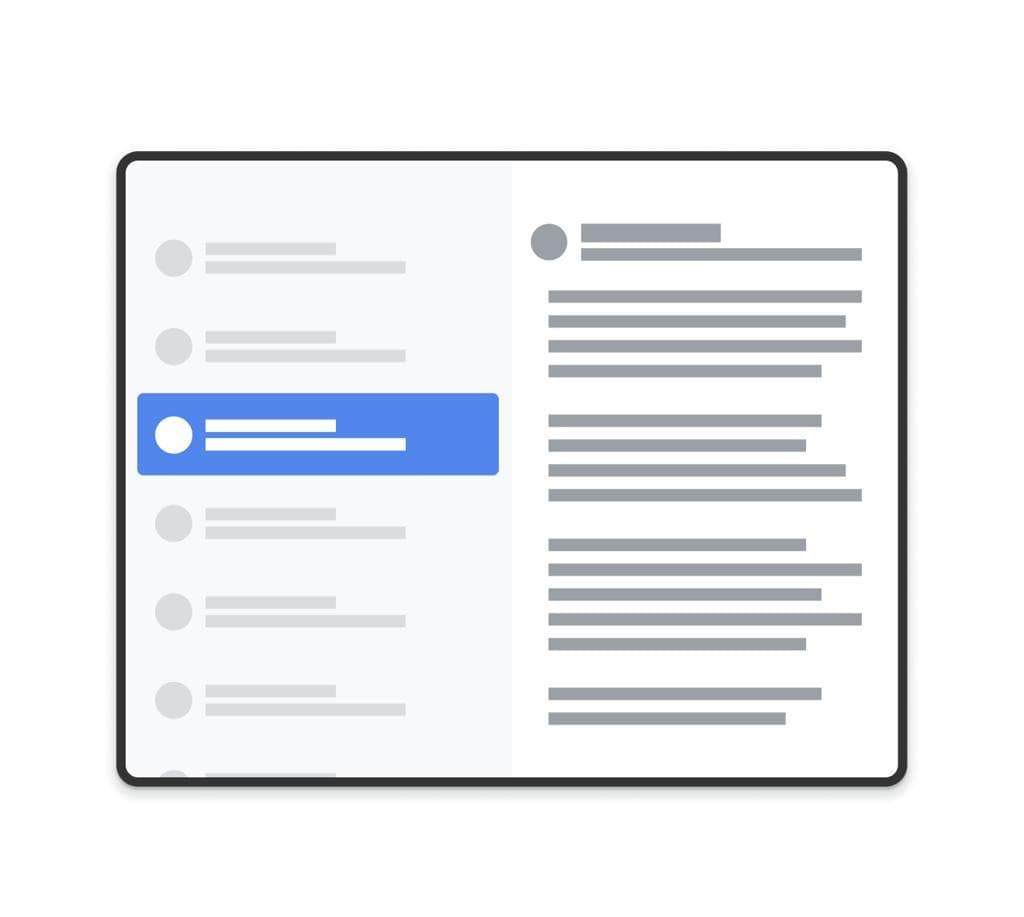
Source: Android Developers documentation on SlidingPaneLayout and two-pane layouts.
Just as importantly, adaptive optimization takes advantage of new hardware and input capabilities available on large-screen devices. Tablets and Chromebooks are frequently used with keyboards, mouse, and trackpads. Apps can leverage pointer precision, hover states, keyboard shortcuts, and hybrid touch-plus-pointer interactions to create experiences that feel faster and more natural.
The goal of adaptive optimization is not merely compatibility—it is enhancement. A well-optimized adaptive app should not feel like a phone app stretched onto a larger display. Instead, users should see more information, navigate less, and complete tasks more efficiently.
3.3 Adaptive Differentiated: Unlocking the Full Potential of New Form Factors
Once an app delivers a strong adaptive experience, the next opportunity is differentiation: the app fully embraces the strengths of a new form factor and delivers capabilities that feel native to that environment.
For Android desktop environments—including Chromebooks, desktop windowing modes, and keyboard-first large-screen devices—an adaptive differentiated app delivers desktop-level productivity. Users should feel they are getting the efficiency expected from comparable desktop software rather than interacting with a phone app running on a larger display.
(1) Multi-Tasking as a First-Class Workflow
Desktop-like environments fundamentally change how users work. Users increasingly operate across multiple simultaneously visible applications rather than focusing on one app at a time.
The focus now shifts from stability to workflow efficiency. An adaptive differentiated app behaves predictably in resizable windows, preserves context during focus changes, and remains usable even while sharing screen space with other applications.
Instead of assuming full-screen ownership, the app becomes a cooperative participant in a broader productivity workspace.
(2) Keyboard-First Productivity
While adaptive-optimized apps support keyboard navigation, adaptive differentiated apps embrace keyboard-first workflows.
Examples include:
- comprehensive keyboard shortcuts for common actions
- fast navigation between workflows
- command-style interactions for power users
- predictable focus traversal and selection behavior
- desktop-consistent shortcuts (Cmd/Ctrl+C, Cmd/Ctrl+F, undo/redo, etc.)
A useful benchmark is simple:
Could an experienced user operate this app efficiently without touching the screen?
(3) Desktop-Class File and Document Workflows
Desktop users also expect richer ways to organize, manipulate, and persist content.
Adaptive differentiated apps increasingly support:
- open/save workflows integrated with the file system
- multiple documents, tabs, or workspaces
- drag-and-drop import/export of content
- richer clipboard behavior across applications
- document persistence across sessions
The key mindset shift is this:
Adaptive differentiated apps do not simply run on a new form factor—they belong there.
When done well, the distinction between "mobile app" and "desktop app" begins to disappear.
4. How to Get Started
Transitioning an existing Android app to an adaptive experience can feel overwhelming, especially for mature applications with years of accumulated UI and platform assumptions. A common mistake is to jump directly into implementation—rewriting layouts, introducing new frameworks, or redesigning workflows—without first understanding the current state of the app.
In practice, getting started with adaptive development involves two steps:
- Perform an adaptive evaluation to understand current gaps
- Develop a strategy to transition the app toward an adaptive experience
For the rest of this section, we focus on the first step: understanding where your app stands today.
Step 1: Perform an Adaptive Evaluation
The goal of evaluation is not simply compatibility—it is understanding the gap between the current experience and the desired experience level.
A structured evaluation helps answer questions such as:
- Does the app remain stable through configuration changes?
- Does the UI adapt meaningfully to larger screens?
- Does the app support keyboard, mouse, and multi-window workflows?
- What prevents the app from reaching the next level of adaptive maturity?
Google provides an excellent starting point through its Adaptive App Compatibility Testing guidance and quality checklist.
Option 1: Self-Evaluation
For teams with internal Android expertise and design skills, self-evaluation is often the best starting point.
Developers can evaluate adaptive readiness using a combination of:
- Android emulators for tablets and foldables
- resizable window environments
- Chromebooks or desktop-like Android environments
- keyboard and mouse testing
- physical devices, device labs, or cloud-based testing services
The objective is to identify gaps across three dimensions:
- Reliability — configuration changes, multi-window behavior, and runtime correctness
- Experience quality — responsive layouts and better large-screen workflows
- Desktop-level workflows — productivity, keyboard efficiency, and file interactions
Rather than producing a simple pass/fail result, a good evaluation generates a prioritized gap analysis that informs engineering investment.
Option 2: Consulting and Testing Services
For organizations with complex applications, limited adaptive expertise, or constrained engineering bandwidth, consulting and testing services can accelerate the evaluation process.
CodeDroid provides an adaptive app quality testing and evaluation service. The service includes:
- assessing adaptive readiness across major user journeys
- identifying UI, workflow, and compatibility gaps
- prioritizing fixes based on user impact and engineering cost
- developing a phased roadmap toward higher adaptive maturity
This approach is especially valuable when teams need an objective assessment or want to accelerate adoption without building specialized expertise internally.
Step 2: Develop a Transition Strategy
Once evaluation is complete, the next step is defining a practical transition strategy. This involves important technical and product decisions, including technology choices, migration strategy, and target experience level.
There are multiple implementation paths—including Jetpack Compose, native Views, and cross-platform frameworks—each with tradeoffs in flexibility, migration effort, and long-term maintainability.
Teams must also determine a realistic target experience level based on:
- current user base and device distribution
- adaptive evaluation results
- codebase complexity and technical debt
- expected ROI for reaching the next level
Some apps may initially target reliability and compatibility, while others may justify deeper investment into optimized experiences or desktop-level productivity depending on business goals and ROI.
We will cover these decisions in a follow-up blog focused on adaptive app migration strategies.
Conclusion
Adaptive development is becoming one of the next major shifts in the Android ecosystem. As foldables, tablets, Chromebooks, and desktop-like Android experiences continue to grow, developers can no longer assume a phone-first environment. Building adaptive experiences is increasingly part of building a great Android app.
Adaptive quality is best viewed as a progression:
Adaptive Ready → Adaptive Optimized → Adaptive Differentiated
Apps should first achieve reliability and compatibility in large-screen environments. From there, they can take advantage of larger displays and richer input models to deliver better experiences. Finally, the most advanced apps can unlock desktop-level productivity and feel native to the form factor.
The most important step is to get started. Perform a thorough adaptive evaluation, understand where your app stands today, and begin building a practical roadmap toward the next level.
For many teams, the full transition to an adaptive experience may ultimately become a major application overhaul. However, this transition also presents a valuable opportunity: adopting test-driven development (TDD) and establishing an AI-native development workflow. As UI architecture evolves and workflows become more adaptive, stronger automated testing and AI-assisted development can help teams modernize their engineering practices alongside the product experience.
References
- Android adaptive app guidance
https://developer.android.com/adaptive-apps - Responsive and adaptive design
https://developer.android.com/develop/ui/views/layout/responsive-adaptive-design-with-views - Adaptive app quality guidelines
https://developer.android.com/docs/quality-guidelines/adaptive-app-quality - Adaptive app compatibility testing
https://developer.android.com/docs/quality-guidelines/adaptive-app-quality#adaptive_app_compatibility_tests - Two-pane layouts and SlidingPaneLayout
https://developer.android.com/develop/ui/views/layout/twopane - Google Play large-screen quality guidance
https://android-developers.googleblog.com/2022/08/raising-bar-on-large-screen-app-quality-on-google-play.html - Google Play on large screens
https://android-developers.googleblog.com/2023/04/google-play-on-large-screens.html - CodeDroid testing
https://www.codedroid.com/#contact